



Full View
Liknande föremål
YI Pro 3pc Kits 2K Home Camera Wi-Fi IP Security Surveillance Smart System With Night Vision Baby Monitor On IOS,
2 425,91kr3 270,65kr
Plug Typ : EU-kontakt

Sensorstorlek : 3 st
3 st
Fartyg från : Kina (fastland
Kina (fastland
Mängd :

Rapportera
Inkludera upphovsrättsintrångGratis standardfrakt. Se detaljer
Beräknad mellan Fri, Jul 24 och Thu, Jul 30
Du kan returnera produkten inom 30 dagar efter mottagandet. Se detaljer
Handla med självförtroende

Pengarna-tillbaka-garanti
Få varan du beställt eller pengarna tillbaka. Läs mer
About this item
Hämtad från LiveEasy
Seller assumes all responsibility for this listing.Artikelnummer: 40012151
Item specifics
Item description from the seller
YI Pro 2K Home Security Camera: 2K&3MP Quality. Capture More Details
View every event in 2K super clear image quality so you see exactly what is happening inside your home. Upgraded 3 million pixels, up to 2304 x 1296 resolution, for clarity in every angle.
Smart AI Detection
YI cloud storage comes with the latest in Smart AI capabilities which can distinguish Person, Vehicle, or Animal accurately and reduce false alarms significantly (Subscription Needed)
Enhanced Night Vision
Equipped with 940-nm infrared lights, a high-sensitivity image sensor and F1.9 large aperture lens, YI 2K home camera captures detailed images even in low-light conditions.
Local SD Card and Cloud Storage
Store your data and recordings locally with an extra SD card (not included) or in the cloud. YI Cloud offers loop-recording with no storage limit, so even if your camera is stolen or damaged, your footage will still be secure and accessible on the cloud.
Large Field of View
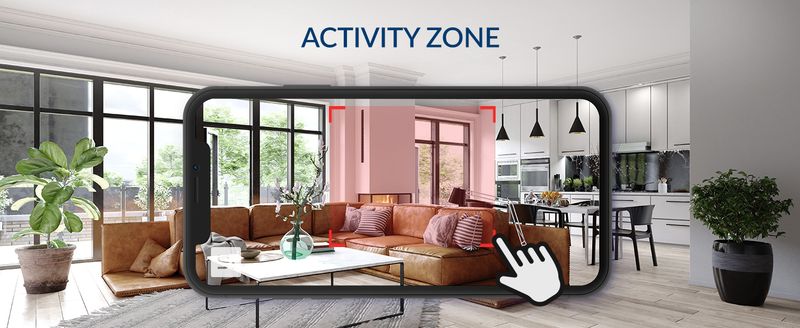
Activity Zone
Only receive alerts when motion is detected in the set zone.
Home and Away Modes
A setting to control phone push notifications turn and off, no disturb when you are home.
Compatible With Alexa and Google Assistant
Use your voice command to turn on YI camera for home security or view your camera live stream on Echo Show or any screen-based Alexa device or Google Chrome Cast.
Setting Up Your Camera With YI Home App
1. Install YI Home App and create a YI Home Account
2. Power your camera on and click the icon on the upper right corner in YI HOME app to add your camera
3. Select your Wi-Fi network and enter your Wi-Fi password, then select Connect to Wi-Fi
4. Scan the QR Code shown on the app, then select Next once the QR Code has scanned
5. Select Save, then select Start to finish pairing
6. If connection fails, please push the Reset button and try again







videoklipp
Videos for this product

