
Webbkameror

4K Autofocus Conference PC Live Broadcast USB Office Meeting House With Microphone 1080P HD Webcam

4K 1080P Mini 2K Full HD Webcam With Microphone 30fps USB Web Cam For Auto Focus PC Laptop Video Shooting Camera

4K HD Mini IP 128GB 1080P Wireless WLAN WiFi Surveillance Camera Spycam Webcams For Detection, Monitoring, Recording
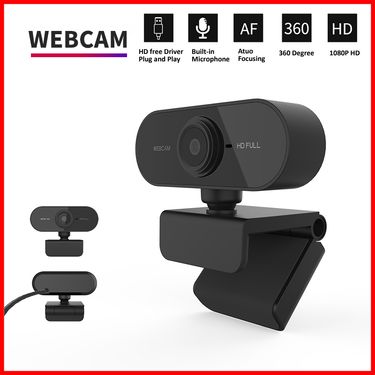
1080P HD Mini Webcam With Microphone, USB Interface Supports Laptop And Desktop Computers, Suitable For Live Video Calls
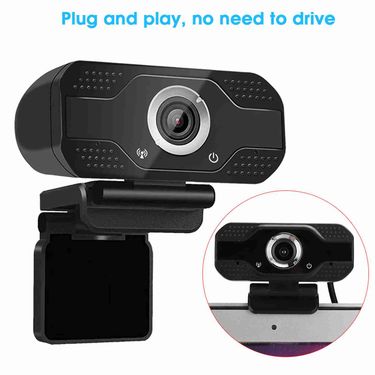
1080P Desktop Online Class With Microphone Computer Drive USB Camera PC Webcam

4k Privatmodell Skönhet Autofokus 1080p Datorkamera HD-nätverk USB Livestreaming Webbkamera 2k-enhet Gratis

S9-1080P Computer With Built-in MIC Call High-definition Network Camera

1080P HD Web Camera With Universal Clips Fits Laptops Desktops LCD Monitors Webcam Full HD Microphone

S9-1080P Computer With Built-in MIC Call High-definition Network Camera

C31 1080P WIFI IP Baby Monitor 120° vidvinkel 2-vägs ljudvideo Night Vision Trådlös PTZ-kamera inomhus

6MP Dual Lens WiFi PTZ Inomhus trådlös Säkerhetsövervakning Smart Home Auto Tracking Baby Monitor CCTV IP-kamera

1080P 2K 4K Computer Webcam For Home Video Calling Company Online Meeting 30fps Full HD Microphone Compatible Multiple

Xinweiqing USB 2.0 720P webbkamera kamera webbkamera med mikrofon för bärbar stationär dator

Xinweiqing USB Cover Universal Anti-spy Ultra-thin Webcam Privacy Shutter Computer Camera Lens Cap for Laptop

4K Microphone For Computer 2K Mini Webcam PC Laptops Live Streaming FHD 1080P Webcam For Work Meetings With Microphone

Xinweiqing hemwebbkamera USB2.0 Night Vision videoinspelningskamera med mikrofon för bärbar dator
Webcams Designed for Work, Learning, and Content Creation
You know that tiny sinking feeling when a meeting starts and your camera turns on… and you immediately want to turn it back off. Maybe the image is grainy, maybe your face looks oddly green, or maybe your voice sounds far away. It’s not vanity—on screen, “clear” often reads as “credible.”
If you’re spending real time on video calls or creating content, you’re probably already noticing what isn’t working. The good news: fixing it usually takes fewer changes than you think.
From Built-In Cameras to External Webcams: What Changes
Built-in webcams are convenient, but they’re also stuck where the laptop designer placed them. While you’re leaning in to type, the angle is looking up your nose, and the image is trying (and failing) to handle mixed lighting.
An external camera gives you control, and control feels calming. If you’re using a Mac setup, a dedicated webcam for mac will let you frame yourself the way you’d like to be seen, especially when you’re switching between “quick call” mode and “presentation” mode.
Once you start refining your setup, accessories like monitor mounts can help position your camera at true eye level, which quietly improves posture and makes conversations feel more natural.
How Better Video Quality Improves Online Presence
Video quality changes how people receive you, even when nobody says it out loud. When you look sharp and well-lit, your message lands more smoothly, and you won’t be fighting the “sorry, your camera is blurry” distraction.
If you’re streaming (or planning to), choosing the best webcam for streaming can make your content feel more polished right away—especially when viewers are watching on bigger screens. Some creators even compare webcams with options like the best budget action camera when they’re experimenting with angles or secondary shots.
For many people, the first upgrade they notice isn’t “wow, 4K,” but “I look like myself again.”
Who Benefits Most From Using an External Webcam
Remote workers tend to notice the payoff quickly, because calls aren’t occasional anymore—they’re daily. When your camera is dependable, you’ll show up with less anxiety, and you won’t be doing that last-second scramble to fix settings.
Students and teachers benefit too, particularly when classes are running back-to-back and you’re already multitasking. A clean setup—sometimes supported by simple tools like USB Hubs—keeps everything connected without turning your desk into a mess of cables.
Creators will feel it in consistency. When you’re recording at night one day and in daylight the next, a smarter webcam helps keep you looking “on brand,” even when real life is changing the lighting every hour.
Important Considerations Like Resolution, Focus, and Audio Support
Resolution matters, but it’s not the only thing that will make you look good. Focus behavior, color accuracy, and low-light performance are what you’ll be noticing after the novelty wears off.
If your desk setup is simple and you don’t want extra gear, a webcam with microphone can be a clean solution. That said, if your room is echo-y or you’re near a loud keyboard, you’ll want to think about how close you’ll be sitting and what your background noise is like.
Lighting is the cheat code most people ignore at first. Adding a webcam light can make early mornings and late nights look more human, and your face won’t be disappearing into shadows whenever the room light shifts.
Common Concerns Buyers Have Before Making a Choice
“Do I need to spend a lot?” Not necessarily. Plenty of shoppers start with a best budget webcam because they want a clear, reliable look for calls—then later decide whether streaming-level quality is worth it.
“Will setup be annoying?” Most modern webcams are plug-and-play, and you’ll be adjusting the angle more than you’ll be installing software. A good rule: if you can position it at eye level and keep it steady, you’re already winning.
“What about privacy?” This one is real. If you work in a shared space or your desk faces your room, a webcam cover will help you relax between calls, because you won’t be wondering whether the camera is active.
 4.4 av 5 baserat på 9,249 recensioner